由 Iconfont 引起的 SVG、TTF、WOFF、WOFF2 图标研究 1.背景 其实很早之前便想通过 Iconfont 来实现图标管理和统一(一方面也是为了偷懒,不,是工程化),然而种种原因拖到了现在。
个人感觉 Iconfont 最大的优势有以下几点:
矢量图标 。相比切图,至少不会糊。可控颜色 。相比切图,至少可以直接换颜色。方便管理和调用 。相比切图,至少不会忘。减少请求 。所有的图标只用一个请求。
在畅快得使用之后,其原理便引起了我的好奇心…
1.1 iconfont iconfont官方网址:http://www.iconfont.cn/
阿里妈妈MUX倾力打造的矢量图标管理、交流平台。设计师将图标上传到Iconfont平台,用户可以自定义下载多种格式的icon,平台也可将图标转换为字体,便于前端工程师自由调整与调用。
1.2 icomoon icomoon官方网址:https://icomoon.io
例子:demo
2 对比 2.1 结果包
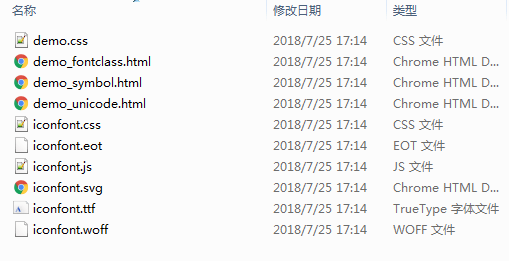
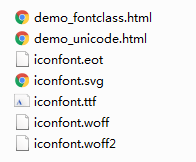
我们整理好下载下来的图标结果目录如图所示,
其中三个html是三种使用方式的demo,其优势和对比在页面里有具体描述,考虑到语义化和兼容,我使用了fontclass这种形式;
iconfont.svg是图标库的svg格式文件;iconfont.eot,iconfont.ttf,iconfont.woff的图标库的字体格式文件;
2.2 svg、eot、ttf、woff比较
注意,这里的SVG指的是svg字体。
2.2.1 介绍 SVG / SVGZ SVG(Scalable Vector Graphics),即矢量图,是用于描述二维矢量图形的一种图形格式。在 Web 中使用 SVG 可以解决位图放大失真的问题。
TTF / OTF TTF(TrueTypeFont)是Apple公司和Microsoft公司共同推出的字体文件格式,随着windows的流行,已经变成最常用的一种字体文件表示方式。部分的因为这种格式容易被非法复制,因此催生了后来的WOFF字体格式。
EOT EOT(Embedded Open Type),是微软创造的字体格式。这种格式只在IE6-IE8里使用。
WOFF WOFF(Web Open Font Format)是一种网页所采用的字体格式标准。此字体格式发展于2009年,现在正由万维网联盟的Web字体工作小组标准化,以求成为推荐标准。此字体格式不但能够有效利用压缩来减少档案大小,并且不包含加密也不受DRM(数位著作权管理)限制。WOFF字体通常比其它字体加载要快,因为使用了OTF和TTF字体里的存储结构和压缩算法。这种字体格式还可以加入元信息和授权信息。
WOFF2(*) WOFF2(Web Open Font Format 2.0),相比woff最大的优化应该是加强了字体的压缩比。
2.2.2 大小对比
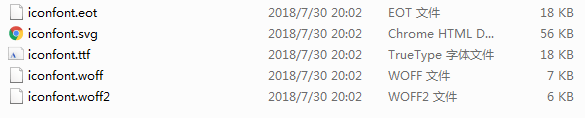
woff2(*) < woff < ttf ≈ eot < svg
从请求量上来看,相同字体内容下,woff\woff2格式的图标库最小。
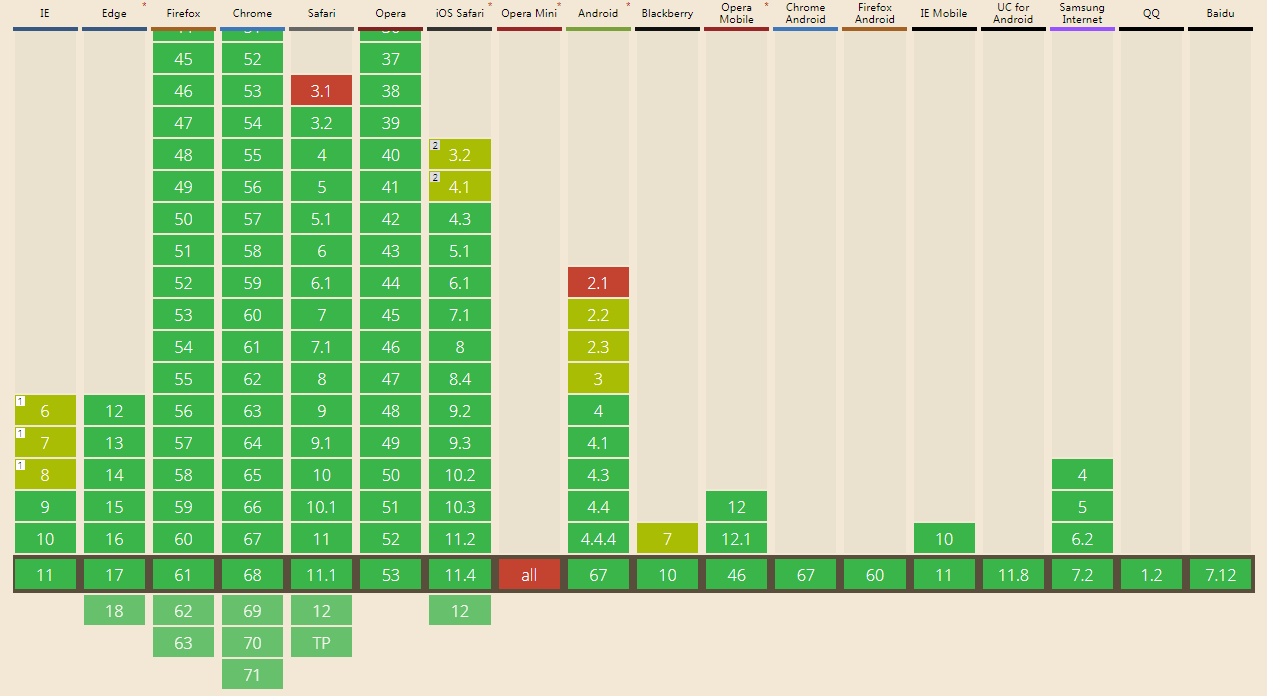
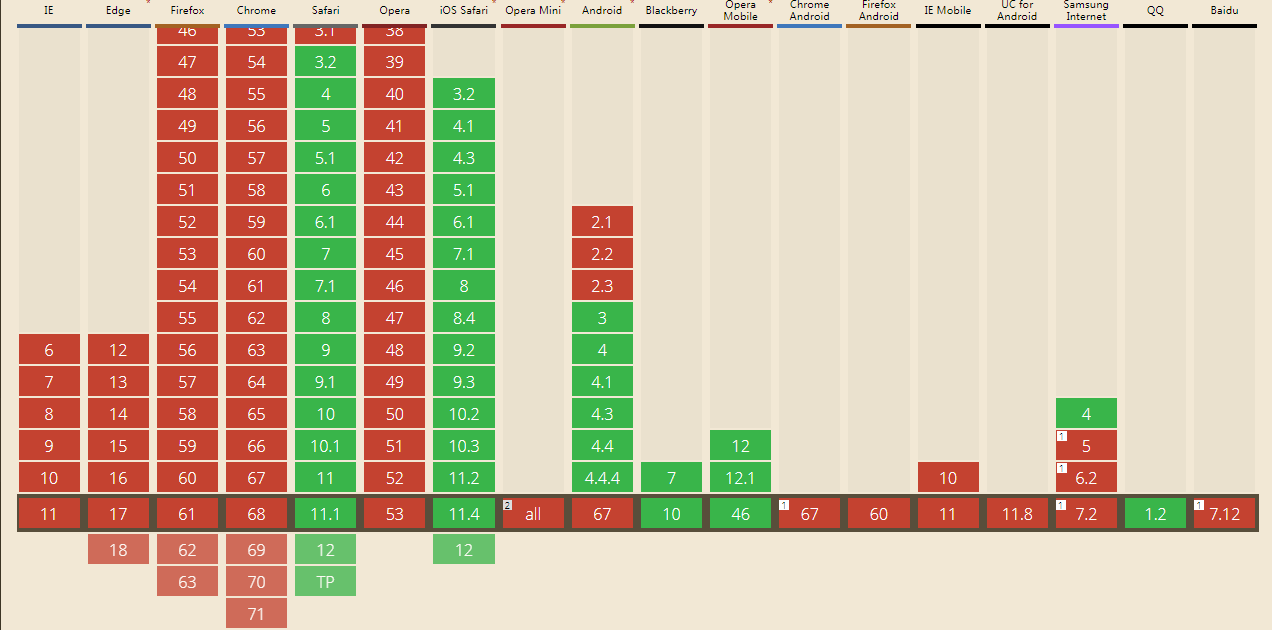
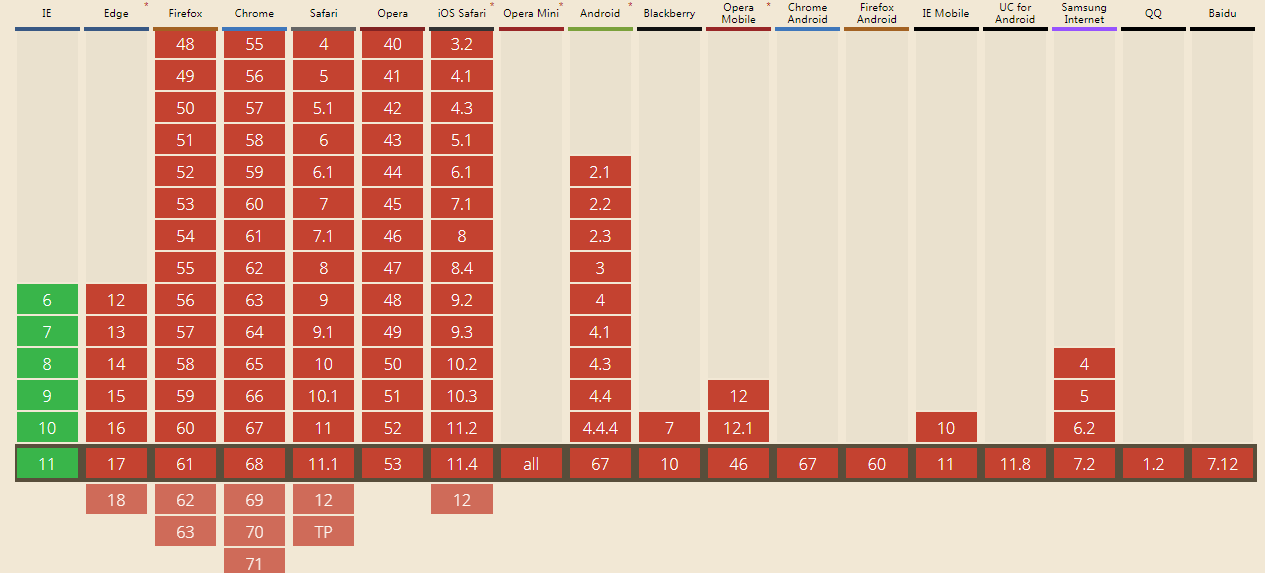
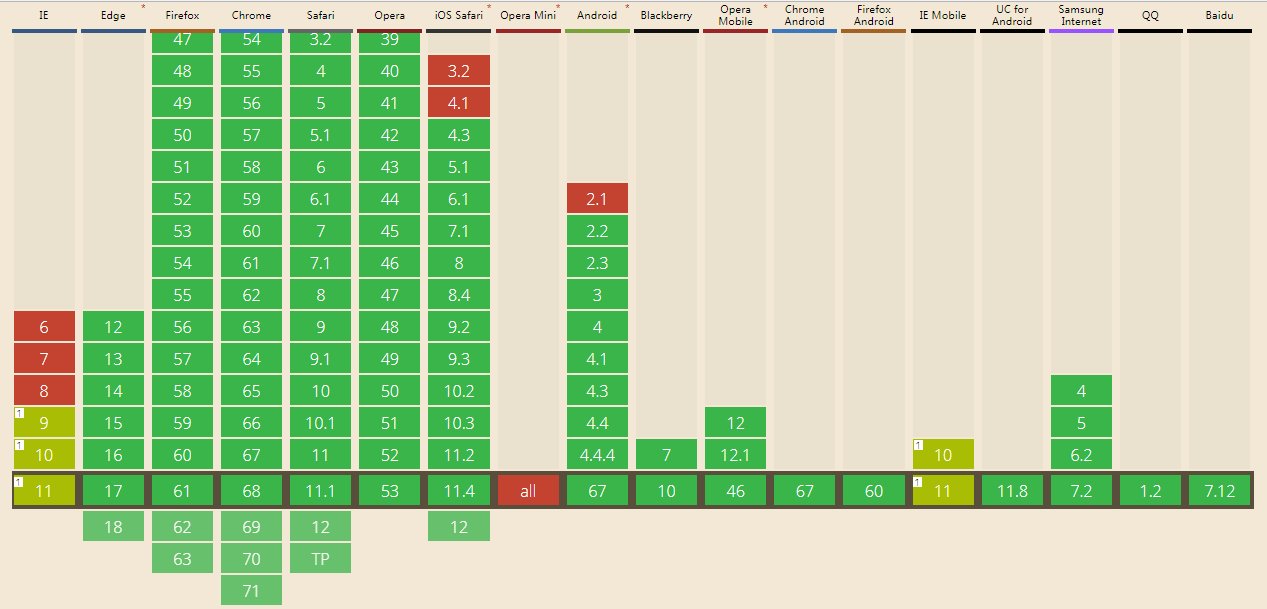
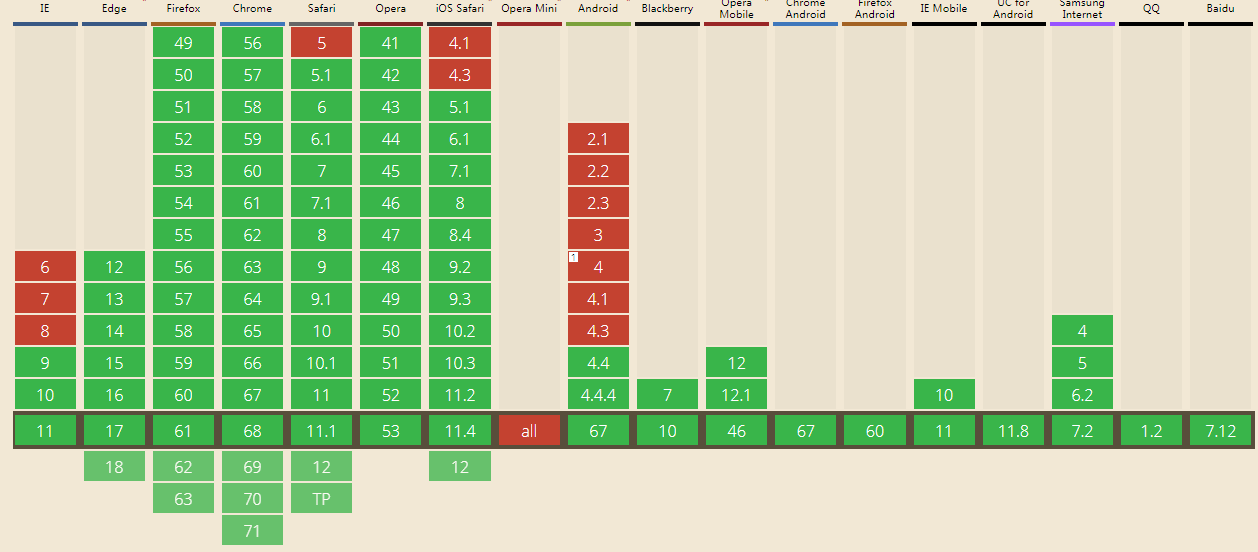
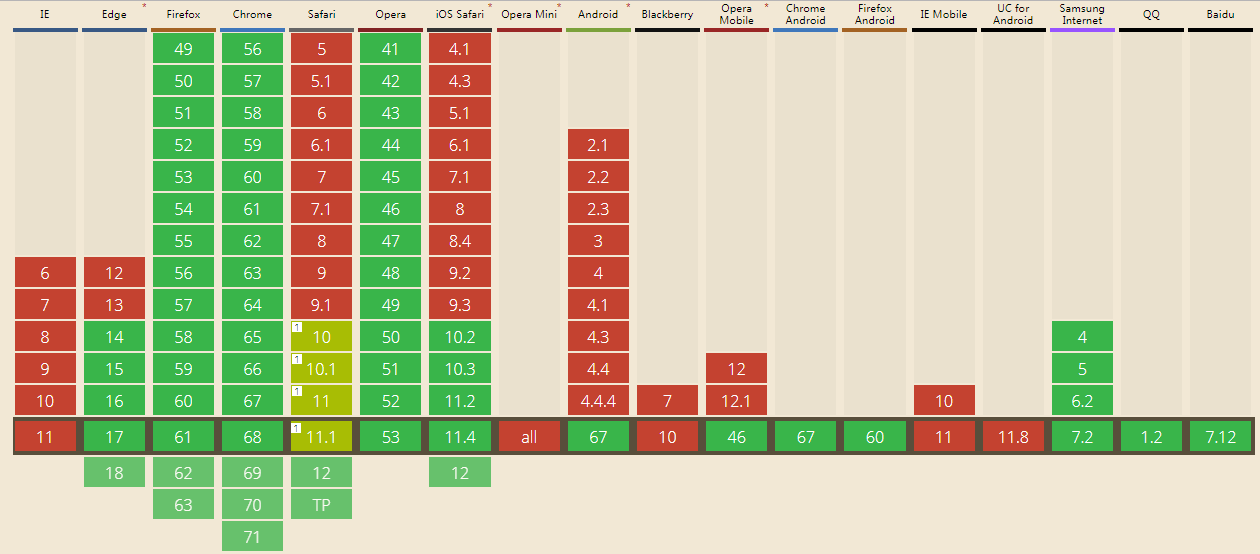
2.2.3 兼容 @font-face: 基本全兼容
svgfont: ios、safari及低端安卓兼容
eot: 只有IE
ttf: 基本兼容,IE兼容情况不是很好
woff: IE9+,android4.4+,其他兼容良好
woff2(*): 除IE及低系统移动端,其他兼容情况较好
从上图来看
font-face支持情况良好,完全可以使用字体形式来实现图标;
PC上兼容较好的是woff格式,ttf对IE的兼容情况不容乐观,svgfont只对Safari兼容,而eot只对IE兼容,如果要做到兼容IE8需要结合eot混着用;
移动上eot完全不兼容,svgfont低端系统能很好兼容但不知道为何高端安卓不再支持,考虑到厂里较特殊的兼容要求(ios8.0,android4.0),最为合适的看来就是woff及ttf格式了。
结合大小和兼容情况来看,可以优先使用woff格式(要兼容安卓4.0的话优先使用ttf),如果要兼容IE低版本的话需要使用eot格式,正如iconfont.css的处理:
1
2
3
4
5
6
7
@font-face {font-family : "iconfont" ; src : url ('iconfont.eot?t=1532589026137' ); src : url ('iconfont.eot?t=1532589026137#iefix' ) format ('embedded-opentype' ), url ('data:application/x-font-woff;charset=utf-8;base64,d09GRgABAAAAAAUkAAsAAAAAB4AAAQAAAAAAAAAAAAAAAAAAAAAAAAAAAABHU1VCAAABCAAAADMAAABCsP6z7U9TLzIAAAE8AAAARAAAAFZW70ftY21hcAAAAYAAAABcAAABhplABr5nbHlmAAAB3AAAAVgAAAFsZoj2dmhlYWQAAAM0AAAALwAAADYSH23BaGhlYQAAA2QAAAAgAAAAJAfgA4NobXR4AAADhAAAAAwAAAAMC+kAAGxvY2EAAAOQAAAACAAAAAgAdgC2bWF4cAAAA5gAAAAfAAAAIAESAF1uYW1lAAADuAAAAUUAAAJtPlT+fXBvc3QAAAUAAAAAIgAAADPge++EeJxjYGRgYOBikGPQYWB0cfMJYeBgYGGAAJAMY05meiJQDMoDyrGAaQ4gZoOIAgCKIwNPAHicY2Bk/sE4gYGVgYOpk+kMAwNDP4RmfM1gxMjBwMDEwMrMgBUEpLmmMDgwVDxjYm7438AQw9zI0AgUZgTJAQAjlgxweJzFkMENgDAMAy9p6QMxCA8G4sUcnbhrFBPKgwlqybHiWEoUYAGSeIgZ7MJ4cMq18BNr+DkyRWo4tXnv6j9VRLMS6iqFabB5q//You6j01eogzqx+Uv8BlHvC5d4nA2PrU7DUABG73dLu3Zs7e7tf7d1a7vtQoCFtWWIhWEwEAQJCkXwDEcwJIAgQSB4ABAQEhwOh+JNCLwCjhT65Ygjz0dkQv4+pXfJIyZZICOyRfYIgbKEWKdtRCIf0iXYkWy7li6JRESVJB5KG3BjxXLScT5wlYpiQEeILErHYkgF1vIpnSB12oDfDPZ5v8WlO1Q9EV4XO/QJdidpGdOVYnt500q7pnpW49zn/FZVZFmldM7QMXMdTdaqSvEsG4H93lmkHdR8Eewe1LtNfnSTn7T7rgZcXsJsdvWXTRawkvPAMblfadRVL6gnPQtn3/OeWWsPvkg5Wn69mIN0RXpEEKJhEFeg2JYzAbPCMplNsZ6FcFlWCsvS8aCfjaSfIlZdrQhrrD6ze6utU1jGq2HhJRniWGf09w14w4emFtMqN8zioTNedPHIHMBhxSFygXuv2SD/wk87NXicY2BkYGAA4kPBpYHx/DZfGbhZGEDgev2URwj6fz0LI3MjkMvBwAQSBQA9GQs1AHicY2BkYGBu+N/AEMPCwMDw/z8LIwNQBAUwAwBx8QRrBAAAAAPpAAAEAAAAAAAAAAB2ALZ4nGNgZGBgYGYIZGBlAAEmIOYCQgaG/2A+AwAQ9wFwAHicZY9NTsMwEIVf+gekEqqoYIfkBWIBKP0Rq25YVGr3XXTfpk6bKokjx63UA3AejsAJOALcgDvwSCebNpbH37x5Y08A3OAHHo7fLfeRPVwyO3INF7gXrlN/EG6QX4SbaONVuEX9TdjHM6bCbXRheYPXuGL2hHdhDx18CNdwjU/hOvUv4Qb5W7iJO/wKt9Dx6sI+5l5XuI1HL/bHVi+cXqnlQcWhySKTOb+CmV7vkoWt0uqca1vEJlODoF9JU51pW91T7NdD5yIVWZOqCas6SYzKrdnq0AUb5/JRrxeJHoQm5Vhj/rbGAo5xBYUlDowxQhhkiMro6DtVZvSvsUPCXntWPc3ndFsU1P9zhQEC9M9cU7qy0nk6T4E9XxtSdXQrbsuelDSRXs1JErJCXta2VELqATZlV44RelzRiT8oZ0j/AAlabsgAAAB4nGNgYoAALgbsgJmRiZGZkYWBsYK1KqO0MpWBAQASpALPAAA=' ) format ('woff' ), url ('iconfont.ttf?t=1532589026137' ) format ('truetype' ), url ('iconfont.svg?t=1532589026137#iconfont' ) format ('svg' ); }
3 转换 据美丽大方的UI小姐姐描述,在iconfont平台上要生成一套字体图标,UI所需要上传的是图标的svg文件。那么生成包里的svg图标库的来源就很清晰了——最简单的方式就是把UI上传的svg文件进行处理。那么问题也来了,其余的ttf/eot/woff字体文件是如何生成的呢?
此节转换过程由nodejs实现,只讲实现不知道原理,不感冒的同学可直接跳过~
目录结构:
3.1 转换为svgfont
例子 脚本(index.js):
1
2
3
4
5
6
7
8
9
10
11
12
13
14
15
16
17
18
19
20
21
22
23
24
25
26
27
28
29
30
31
32
33
34
35
36
37
38
const join = require ('path' ).join ;const fs = require ('fs' );const SVGIcons2SVGFontStream = require ('svgicons2svgfont' );const DIST_PATH = join (__dirname, 'dist/iconfont.svg' );const fontStream = new SVGIcons2SVGFontStream ({ fontName : 'iconfont' }); fontStream.pipe (fs.createWriteStream (DIST_PATH )) .on ('finish' , function ( console .log (`SvgFont successfully created!(${DIST_PATH} )` ) }) .on ('error' , function (err ) { console .log (err); }); const glyph1 = fs.createReadStream (join (__dirname, 'src/svg/ad-1.svg' )); glyph1.metadata = { unicode : ['\uE001' ], name : 'icon1' }; fontStream.write (glyph1); const glyph2 = fs.createReadStream (join (__dirname, 'src/svg/add-pluss-1.svg' ));glyph2.metadata = { unicode : ['\uE002' ], name : 'icon2' }; fontStream.write (glyph2); fontStream.end ();
执行: node index
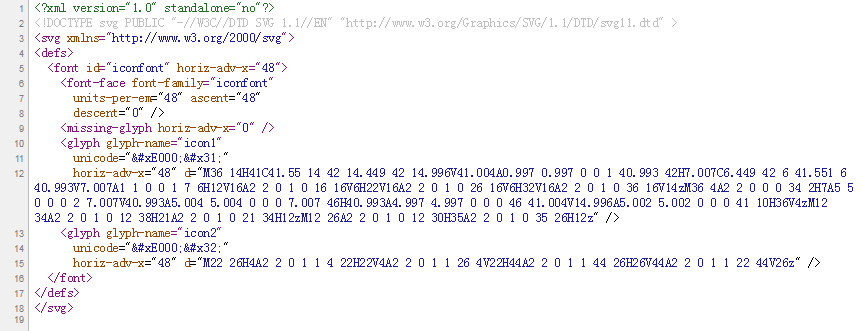
查看svg源码:
使用(index.html):
1 2 3 4 5 6 7 8 9 10 11 12 13 14 15 16 17 18 19 <style type ="text/css" > @font-face {font-family : "iconfont" ; src : url ('dist/iconfont.svg#iconfont' ) format ('svg' ); } .u-iconfont { display : inline-block; font-family :"iconfont" !important ; font-size :26px ; font-style :normal; -webkit-font-smoothing : antialiased; -moz-osx-font-smoothing : grayscale; } </style > <h1 > iconfont——svgfont</h1 > <div > <em class ="u-iconfont" >  </em > <em class ="u-iconfont" >  </em > </div >
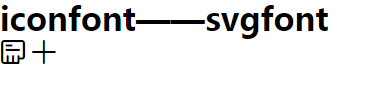
页面展示:
3.2 svgfont转ttf
例子 脚本(index.js):
1
2
3
4
5
6
7
8
9
10
11
12
13
14
15
const fs = require ('fs' );const join = require ('path' ).join ;const svg2ttf = require ('svg2ttf' );const DIST_PATH = join (__dirname, 'dist/iconfont.ttf' ); let ttf = svg2ttf (fs.readFileSync (join (__dirname, 'dist/iconfont.svg' ), 'utf8' ), {});fs.writeFile (DIST_PATH , new Buffer (ttf.buffer ), (err, data ) => { if (err) { console .log (err); return false ; } console .log (`Ttf icon successfully created!(${DIST_PATH} )` ) });
使用(index.html):
1 2 3 4 5 6 7 8 9 10 11 12 13 14 15 16 17 18 19 <style type ="text/css" > @font-face {font-family : "iconfont" ; src : url ('dist/iconfont.ttf#iconfont' ) format ('truetype' ); } .u-iconfont { display : inline-block; font-family :"iconfont" !important ; font-size :26px ; font-style :normal; -webkit-font-smoothing : antialiased; -moz-osx-font-smoothing : grayscale; } </style > <h1 > iconfont——svgfont</h1 > <div > <em class ="u-iconfont" >  </em > <em class ="u-iconfont" >  </em > </div >
执行: node index
页面展示:
3.3 ttf转eot
脚本(index.js):
1
2
3
4
5
6
7
8
9
10
11
12
13
14
15
16
17
18
const fs = require ('fs' );const join = require ('path' ).join ;const ttf2eot = require ('ttf2eot' );const DIST_PATH = join (__dirname, 'dist/iconfont.eot' ); let ttf = fs.readFileSync (join (__dirname, 'dist/iconfont.ttf' ));let eot = new Buffer (ttf2eot (ttf).buffer );fs.writeFile (DIST_PATH , eot, (err, data ) => { if (err) { console .log (err); return false ; } console .log (`Eot icon successfully created!(${DIST_PATH} )` ) });
使用(index.html):
1 2 3 4 5 6 7 8 9 10 11 12 13 14 15 16 17 18 19 20 <style type ="text/css" > @font-face {font-family : "iconfont" ; src : url ('dist/iconfont.eot' ); src : url ('dist/iconfont.eot#iefix' ) format ('embedded-opentype' ), } .u-iconfont { display : inline-block; font-family :"iconfont" !important ; font-size :26px ; font-style :normal; -webkit-font-smoothing : antialiased; -moz-osx-font-smoothing : grayscale; } </style > <h1 > iconfont——eot</h1 > <div > <em class ="u-iconfont" >  </em > <em class ="u-iconfont" >  </em > </div >
执行: node index
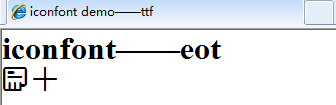
页面展示(IE):
3.3 ttf转woff
脚本(index.js):
1
2
3
4
5
6
7
8
9
10
11
12
13
14
15
16
17
18
const fs = require ('fs' );const join = require ('path' ).join ;const ttf2woff = require ('ttf2woff' );const DIST_PATH = join (__dirname, 'dist/iconfont.woff' ); let ttf = fs.readFileSync (join (__dirname, 'dist/iconfont.ttf' ));let woff = new Buffer (ttf2woff (ttf).buffer );fs.writeFile (DIST_PATH , woff, (err, data ) => { if (err) { console .log (err); return false ; } console .log (`Woff icon successfully created!(${DIST_PATH} )` ) });
使用(index.html):
1 2 3 4 5 6 7 8 9 10 11 12 13 14 15 16 17 18 19 <style type ="text/css" > @font-face {font-family : "iconfont" ; src : url ('dist/iconfont.woff#iconfont' ) format ('woff' ); } .u-iconfont { display : inline-block; font-family :"iconfont" !important ; font-size :26px ; font-style :normal; -webkit-font-smoothing : antialiased; -moz-osx-font-smoothing : grayscale; } </style > <h1 > iconfont——woff</h1 > <div > <em class ="u-iconfont" >  </em > <em class ="u-iconfont" >  </em > </div >
执行: node index
页面展示:
3.4 ttf转WOFF2(*)
脚本(index.js):
1
2
3
4
5
6
7
8
9
10
11
12
13
14
15
16
17
18
const fs = require ('fs' );const join = require ('path' ).join ;const ttf2woff2 = require ('ttf2woff2' );const DIST_PATH = join (__dirname, 'dist/iconfont.woff' ); let ttf = fs.readFileSync (join (__dirname, 'dist/iconfont.ttf' ));let woff2 = new Buffer (ttf2woff2 (ttf).buffer );fs.writeFile (DIST_PATH , woff2, (err, data ) => { if (err) { console .log (err); return false ; } console .log (`Woff2 icon successfully created!(${DIST_PATH} )` ) });
使用(index.html):
1 2 3 4 5 6 7 8 9 10 11 12 13 14 15 16 17 18 19 <style type ="text/css" > @font-face {font-family : "iconfont" ; src : url ('dist/iconfont.woff2#iconfont' ) format ('woff2' ); } .u-iconfont { display : inline-block; font-family :"iconfont" !important ; font-size :26px ; font-style :normal; -webkit-font-smoothing : antialiased; -moz-osx-font-smoothing : grayscale; } </style > <h1 > iconfont——woff2</h1 > <div > <em class ="u-iconfont" >  </em > <em class ="u-iconfont" >  </em > </div >
执行: node index
页面展示:
4 svgs2fonts 结合以上的插件,自己撸了个批量转换的包。——svgs2fonts: svg图标转字体图标库(svgs -> svg,ttf,eot,woff,woff2)。
原理很简单:
1 svgs -> svg font > ttf > eot/woff/woff2
4.1 安装使用 安装: 验证: 使用: 1 svgs2fonts {{srcpath}} {{distpath}} --options
srcpath: svg源文件路径(相对当前窗口环境),传””时为当前窗口路径;
distpath: 导出路径,默认在源文件路径下;
example 参数 -n / –name 图标库的名字(default: “iconfont”).
example 1 svgs2fonts svg dist -n myiconfont
–number unicode起始编码(default: 10000).
example 1 svgs2fonts svg dist --number 50000
–nodemo 不要demo html.
example 1 svgs2fonts svg dist --nodemo
生成结果:
demo_fontclass.html:使用class展示的demo页面;
demo_unicode.html:使用unicode展示的demo页面;
有建议或想砸鸡蛋可 -> michealwayne@163.com
参考资料:






Author
My name is Micheal Wayne and this is my blog.
I am a front-end software engineer.
Contact: michealwayne@163.com